Cloud-hosted or on-premises? It’s the question PIP is asked most — so we ran the actual numbers for a typical 10-user business. Here’s the complete cost comparison, and why our answer has shifted in recent years.
In today’s rapidly evolving IT landscape, businesses face a pivotal decision: host their infrastructure in the cloud or maintain it on-premises. Cloud-hosted solutions offer scalability, flexibility, and reduced upfront costs, while on-premises setups promise control, security, and long-term cost predictability. Both have their merits, and the choice often hinges on an organisation’s size, regulatory environment, and operational priorities.
The lines between the two are blurring, though. Software vendors are shifting aggressively toward subscription pricing — even for traditionally on-premises products — so on-premises deployments now often include recurring licensing, support contracts, and hybrid cloud integrations. What was once a straightforward capital-versus-operational-expenditure debate now demands a deeper analysis of total cost of ownership, vendor lock-in, and long-term scalability.
PIP maintains a neutral stance here. We’ve delivered onsite IT support for over 30 years and still do. We also operate our own private cloud platform, housed in an ISO/IEC 27001 certified Sydney datacentre, and as a certified Microsoft Partner we offer the full Microsoft ecosystem through Microsoft 365 and Azure. Historically we recommended on-premises to single-office clients wanting a simple, cost-effective setup. But inflationary pressures, the hybridisation of software platforms, and the growing demand for strong cyber security have shifted that — today we suggest cloud for the majority of clients, and we’re often surprised how cloud pricing can match or beat a traditional on-premises setup.
Below we outline the typical costs of both models for a new start-up. These figures are a guide — adjust them to your business. We’ve used a generic office with an initial 10 users. The server may be overkill, but many servers today run multiple roles through virtualisation (domain controller, file server, plus SQL Server for core databases and/or Terminal Services for remote access).
- We priced a 10-user office both ways: on-premises servers and workstations vs PIP’s Australian private cloud with thin terminals.
- On-premises means a large upfront capital outlay ($41,250) plus ongoing subscriptions, maintenance and managed-service costs.
- The cloud model shifts almost everything to a single predictable monthly fee — no server to buy, patch, power or replace.
- On the summary comparison, the fully managed cloud solution comes out lower per month than the equivalent on-premises build.
- The bottom line: an enterprise-grade Australian solution, hosted in an ISO/IEC 27001 certified datacentre, can now cost the same as — or less than — doing it yourself.
A quick primer
Cloud computing delivers IT services — servers, storage, databases, networking, software — over the internet. It removes the big upfront hardware investment: you scale usage up or down and pay for what you consume. Services span Infrastructure-as-a-Service (IaaS), Platform-as-a-Service (PaaS), and Software-as-a-Service (SaaS), offered by providers like AWS and Microsoft Azure across public, private, and hybrid models.
PIP offers a secure, Australian-hosted private cloud for businesses of all sizes, especially compliance-heavy sectors like healthcare. Hosted on PIP’s own infrastructure in an ISO/IEC 27001 certified Sydney datacentre, it delivers enterprise-grade performance, data security, full data sovereignty, and predictable pricing — with tailored IaaS, private Exchange hosting, and warm/hot backup options, all backed by PIP’s 24×7 helpdesk.
What does an on-premise setup cost?
Setting up on-premises means significant upfront cost — server hardware, networking, software licences, storage, backup, and the physical space to house it all. Beyond the initial outlay come maintenance, hardware upgrades, energy, and IT labour, plus the risk of vendor lock-in on licensing.
| Item | Cost |
|---|---|
| HP ML350 G11 Server — dual Xeon, 32GB RAM, 4×1TB SSD | $15,000 |
| Windows 2025 Server | $1,800 |
| Backup software | $550 |
| Backup NAS for local backups | $1,500 |
| 10× HP desktop computers + monitors (@ $1,800 each) | $18,000 |
| Setup, configuration & rollout of PCs and network | $4,400 |
| Routers, switches, printers & scanners are excluded — they’re needed for either on-premises or cloud. | |
| Total capital outlay for on-premises infrastructure | $41,250 |
| Extrapolated over a 36-month life (PC/server warranty period)* | $1,145 / mo |
*Interest on the lease or lost interest on invested capital is not included.
| Item | Cost |
|---|---|
| Monthly cloud backup storage | $330 |
| 10× Microsoft 365 Business Premium (chosen for the security add-ons now expected) | $366 |
| Total monthly subscription fees | $916 / mo |
Based on this setup we reach an extrapolated on-premises total monthly cost of $1,861 — before any interest on the lease or lost interest on invested capital. We chose Microsoft 365 Business Premium because it includes the virus and advanced cyber-security protection now expected under Australian cyber security legislation. The alternative is a managed-service agreement that bundles those tools — adding an IT managed service would typically cost $50–$150 per device, so a further $500–$1,500 per month. A cheaper server would help only marginally: even dropping to a $10K server reduces the monthly figure by just $138.
What does hosted cloud computing cost?
| Item | Cost |
|---|---|
| 10× Intel Windows remote desktop terminals + 26″ monitors | $6,600 |
| Setup, configuration & rollout of PCs and network | $550 |
| Routers, switches, printers & scanners excluded — needed for either solution. | |
| Total capital outlay for cloud IT infrastructure | $7,150 |
| Extrapolated over a 36-month life* | $199 / mo |
| Item | Cost |
|---|---|
| 10× PIP Standard Private Cloud — includes all licences, Microsoft Office, servers, services, management & backups | $1,500 |
| Total cloud monthly subscription fees | $1,500 / mo |
Here we’ve used sleek, large-screen modern thin terminals for all users. One user might still need a standalone PC for CAD or graphics work — but that wasn’t accounted for in the on-premise quote either. For a hosted service this size we’d usually suggest two internet connections, so add $70–$80 for a PIP local-only broadband service. Internet reliance is a key consideration: cloud access depends on stable connectivity, and any disruption affects availability.
However you run the numbers, you end up with a completely managed, highly secure, enterprise solution housed in a purpose-built Australian ISO 27001 datacentre — for less than you can set it up in house. The provider maintains the hardware, security, and compliance, and takes responsibility for uptime and data protection.
An on-premises total of $1,861 / month versus a fully managed cloud solution at $1,699 / month.
Hybrid cloud solutions
Hybrid cloud combines the strengths of both. Businesses keep sensitive data and mission-critical applications on-premises — full control and compliance — while using the scalability and cost-efficiency of cloud for less sensitive workloads or demand spikes. It typically integrates private clouds with public cloud services, creating a smooth, secure environment where data and applications move between systems. Because critical operations can continue locally even if cloud access drops, hybrid also reduces reliance on a single internet connection.
On-premises vs cloud — the comparison
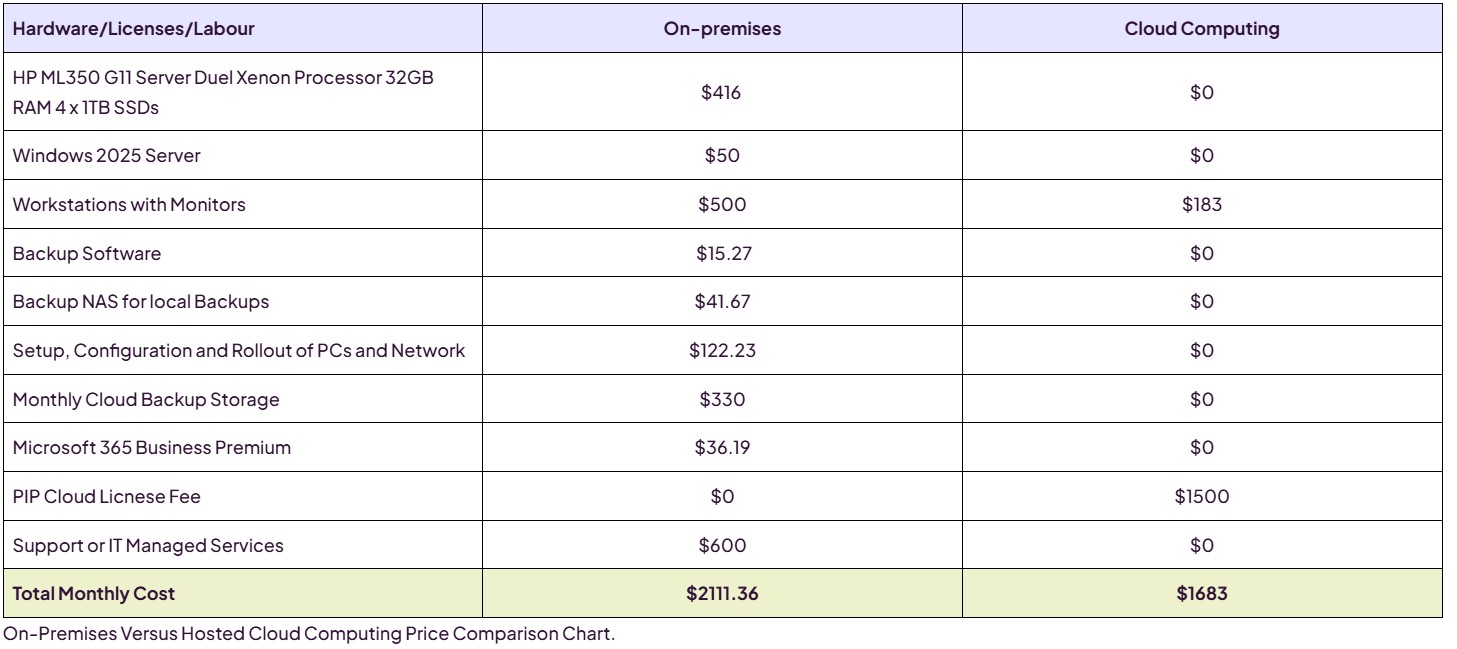
A quick summary of everything above. All capital expenses are converted to a monthly figure over 36 months — the standard IT equipment lifecycle, and the hardware warranty period PIP provides.
| Hardware / licences / labour | On-premises | Cloud |
|---|---|---|
| HP ML350 G11 Server (dual Xeon, 32GB, 4×1TB SSD) | $416 | $0 |
| Windows 2025 Server | $50 | $0 |
| Workstations with monitors | $500 | $183 |
| Backup software | $15.27 | $0 |
| Backup NAS for local backups | $41.67 | $0 |
| Setup, configuration & rollout | $122.23 | $0 |
| Monthly cloud backup storage | $330 | $0 |
| Microsoft 365 Business Premium | $36.19 | $0 |
| PIP cloud licence fee | $0 | $1,500 |
| Support / IT managed services | $600 | $0 |
| Total monthly cost | $2,111.36 | $1,683 |
Security & scalability
On-premises gives complete control over data, applications, and security protocols — important for sensitive or highly regulated workloads. But maintaining strong security on-premises takes significant investment in hardware, software, and skilled people, and those environments can still be exposed to internet-based threats.
Cloud provides built-in security, regular updates, and advanced threat protection managed by providers who invest heavily in security infrastructure. It also excels at scalability — you adjust resources to match demand without the delay or cost of upgrading on-premises hardware. Providers like AWS and Azure offer auto-scaling and load balancing for high availability as demand shifts, letting businesses respond quickly to growth or seasonal change.
So which is better?
It still depends. Cloud is excellent for accessing your data anywhere, but it needs a good-quality internet connection — and for some clients a fibre-based Ethernet connection adds around $400/month. The choice isn’t black and white. But one reality is increasingly clear: today a business can access a professional, enterprise-grade IT solution — hosted in a leading Australian datacentre — for the same cost, or less, than managing the system themselves.
That brings real advantages: no large power bills, no worrying about outages, theft, overheating hardware, or breaches — and no ongoing burden of patching, monitoring, backups, and hardware replacement, since those are automated or included. For start-ups and SMEs especially, it means access to infrastructure once reserved for large enterprises, without the overhead or complexity.
PIP supports you either way
Whether your business runs in the cloud or on-premises, PIP delivers friendly, enterprise-grade support for businesses of all sizes — with fair, affordable pricing. Not sure which model fits? We’ll run the numbers for your setup.
Talk to PIP about your IT →