
Proxmox Datacenter Manager — Multi-Cluster Management Across Sites
One interface. Every Proxmox cluster. Any number of sites.
Proxmox Datacenter Manager is a separate product that gives you one management interface across multiple Proxmox VE clusters — a single pane of glass for distributed infrastructure, wherever your sites are. PIP designs, deploys and manages PDM as part of complete Proxmox environments across Australia.
What is Proxmox Datacenter Manager?
Proxmox Datacenter Manager (PDM) is built for organisations running multiple Proxmox clusters across multiple sites. Where Proxmox VE manages everything inside a single cluster, the Datacenter Manager is the layer above it — a centralized management solution that coordinates across many Proxmox VE clusters from one console. It is a separate product, not a feature of Proxmox VE.
PDM does not replace Proxmox VE; it sits above your existing clusters and gives multi cluster management a single home. One installation of Proxmox Datacenter Manager connects to and manages any number of Proxmox VE clusters and Proxmox Backup Server instances, turning distributed virtualization across complex and distributed infrastructures into one coherent view. The organisations that reach for the Datacenter Manager are the ones whose estate has outgrown a single cluster: a managed service provider running clusters at many client sites, a business with nodes in several branch offices, or a team operating high availability clusters in more than one data centre. Once you are opening a separate browser tab for every cluster — and another again for each Proxmox Backup Server — a single management plane stops being a convenience and becomes a requirement. Proxmox Datacenter Manager is the answer to that estate sprawl: the clusters stay independent and self-governing, but the people who run them finally get one place to look.
Automated Host Provisioning
The headline capability in this stable version is automated provisioning. Define an answer file in the Datacenter Manager, boot the target server from a compatible ISO, and the new node configures itself — no human at the keyboard. For a managed service provider this is the difference between a half-day of manual setup and an unattended build: stage the answer files once, boot each new node, and Proxmox Datacenter Manager brings consistent Proxmox VE nodes online across every site, with the same disk layout, network and subscription key every time. When you are standing up a cluster in stages, onboarding a new client site, or refreshing hardware across dozens of nodes, repeatable provisioning is what keeps a growing estate sane. The alternative — hand-building each node, then remembering to register its subscription afterwards — is exactly where configuration drift and missed renewals creep in.
Answer Files
An answer file specifies the full build of a node: network configuration, disk layout, locale, system parameters and subscription key. Installing Proxmox Datacenter Manager once gives you a configuration server that drives consistent installs across every new host.
Bearer Token Security
Answer files are delivered over HTTPS using per-installation bearer tokens. Each token is scoped to a single installation, reviewable, and revocable — the same discipline you would expect from API tokens elsewhere in the datacenter manager project.
Subscription Integration
Subscription keys can be bundled directly into the answer file, so new nodes self-register during provisioning. The subscription step that usually trails a manual install simply happens as part of the build.
Current Limitations
This is a first iteration. In PDM 1.1, LACP network bonding and post-boot scripting are not yet available for local installations — both are on the roadmap for future releases of the stable version.
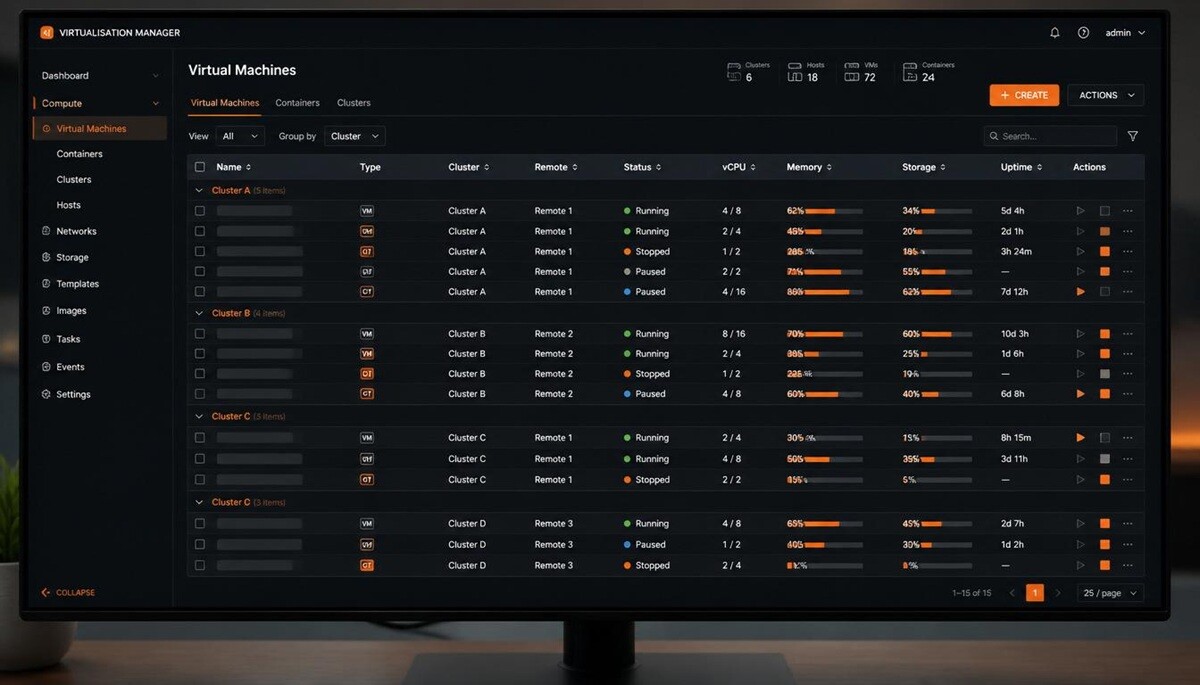
Cross-Cluster Guest Management
See every QEMU virtual machine and LXC container across all connected clusters in one place — and act on them without opening a single cluster’s interface. In practice an administrator can rebalance load across nodes, drain nodes for maintenance using live migration, and recover capacity, all without logging into each cluster in turn. The unified view spans all connected clusters, so the perennial question of which node a guest is running on has a one-screen answer. For a team managing dozens of clusters, that consolidation is the whole point: the daily work of starting, stopping and moving guests stops being a tour of browser tabs and becomes a single, filterable list.
Unified Guest View
All virtual guests from every connected remote appear in one interface — a sortable table view across all remotes, or a tree view grouped by remote, both with text filtering. Find a specific virtual machine on a specific remote without hunting through individual nodes.
Available Operations
From the unified view you can start, stop and resume paused or suspended guests, and perform remote migration of virtual guests between nodes and between different clusters. Cross cluster live migration moves a running guest from one cluster to another, and Proxmox Datacenter Manager enables basic management of guests at scale.
Snapshot Management
Create, roll back, edit and delete snapshots across remotes from the same console. Migrations of virtual guests and snapshot operations are coordinated centrally rather than cluster by cluster.

Unified Ceph Monitoring
A single dashboard aggregates Ceph health, capacity and performance from every connected hyper-converged cluster — no tab-switching across sites.
What PDM Monitors
The Datacenter Manager surfaces cluster health status, OSD status, capacity utilisation and performance metrics, plus monitor and manager node status, metadata servers, storage pools and CephFS. RRD graphs give update visibility over time, not just a point-in-time snapshot.
Centralised Storage Visibility
Previously, a cross-cluster Ceph view meant opening each cluster’s interface in turn. Proxmox Datacenter Manager consolidates the health of every hyper-converged cluster into one centralized overview, so a degraded OSD or a pool nearing capacity on any of your clusters is visible from a single screen. For distributed Ceph spread across multiple nodes and sites, that early-warning visibility is the difference between a planned expansion and an emergency one.
Dashboard and World Map
PDM’s dashboard turns a fleet of clusters into a single quick overview — resource gauges, host metrics, and a geographic map of where everything runs.
Resource Gauges
Gauge-based widgets show CPU, memory and storage utilisation across all connected remotes, with RRD graphs for PDM’s own host. You get usage metrics for the managed estate and visibility of the management layer itself — capacity trends across every cluster and node in one view, so headroom planning is based on the whole estate rather than one cluster at a time.
World Map View
Assign geographic coordinates to each remote and the dashboard plots location pins on a world map. For organisations with globally scaled data centers — or simply infrastructure across several Australian cities and an offshore site — the map gives genuine at-a-glance context across data centers.
Centralised Subscription Management
PDM 1.1 includes a centralised subscription registry for update management across every connected remote. View subscription status for all of your remotes from one interface, assign keys to a specific remote, and bundle those keys into provisioning answer files so new hosts register themselves.
A standard Proxmox subscription (Basic or above) includes PDM support. Centralising keys this way also tightens privilege management and keeps you clear of the vendor lock in that comes with proprietary multi-site tooling — the registry is open, the keys are yours.
Deployment and Requirements
The practical detail for sysadmins: what PDM runs on, what your clusters need, and how it connects to remote sites.
Platform Stack
Proxmox Datacenter Manager installs on Debian 13.5 “Trixie”, on a dedicated host or as a VM on separate infrastructure — kept off the clusters it manages so the management plane survives a cluster outage.
Cluster Requirements
Managed clusters need Proxmox VE 8.4 or later; PBS remotes need Proxmox Backup Server 3.4 or later. PDM coordinates these independent nodes and underlying hosts without changing how each PVE cluster runs internally.
Network Connectivity
Reverse proxies are not supported for connectivity to managed remotes — use WireGuard or OpenVPN for encrypted cross-site links. These cluster network requirements keep traffic between PDM, the multiple nodes, Proxmox VE clusters and Proxmox Backup Server remotes private across the public internet.
| Component | PDM 1.1 |
|---|---|
| Base OS | Debian 13.5 |
| Kernel | Linux 7.0 |
| ZFS | 2.4 |
| Minimum Proxmox VE | 8.4 |
| Minimum PBS | 3.4 |
Proxmox Datacenter Manager in a Managed Environment
PIP deploys Proxmox Datacenter Manager as the control layer for clients running Proxmox VE and Proxmox Backup Server across multiple sites. We design where PDM sits, how it reaches each cluster over encrypted links, how nodes are provisioned and subscribed, and how Proxmox Backup Server remotes are monitored alongside the clusters they protect — then run the whole estate as a managed service rather than handing you a console and walking away.
For organisations with high availability clusters in more than one location, the Datacenter Manager is what turns a set of independent Proxmox clusters into a single, monitored, centrally managed footprint. You keep the open-source platform and full control of every node; PIP adds the engineering, the provisioning discipline, and Australian-timezone support across all of your clusters.
“The automated provisioning is the feature that changes the deployment conversation. Before PDM 1.1, every new Proxmox host was a manual process — run the installer, configure the node, add it to the cluster, sort the subscription. That sequence is fine once. When you’re rolling out infrastructure at multiple client sites or building a cluster out in stages, having PDM as the configuration server with answer files and bearer tokens changes the workflow considerably. The subscription integration is underrated — one fewer step at exactly the point where you’re already doing the most manual work.”— Brad Dixon, PIP
Managing Proxmox at scale? Talk to PIP.
PDM makes sense when you’re running multiple Proxmox clusters across multiple sites. PIP can help you design the architecture, deploy Proxmox Datacenter Manager, and manage it as part of a fully managed Proxmox environment.