
Windows 11 RDP Connection Signing
Microsoft has recently changed how Windows 11 handles Remote Desktop (.rdp) files, introducing stricter security checks and placing a much stronger emphasis on digitally signed RDP connections.
These changes are designed to reduce the growing risk of RDP‑based phishing attacks — but they also affect long‑standing workflows used by IT teams and software vendors.
Understanding what changed, why it matters, and how to respond is critical for any organisation that relies on Remote Desktop.
Applies to Windows 11 (24H2, 25H2) – April 2026 security updates
For Instructions on How to Digitally Sign RDP icons, check our PIPs post – How To Digitally Sign RDP Files
What Changed in Windows 11
Beginning with the April 2026 Windows security updates, Microsoft introduced new safeguards that apply specifically when opening RDP (.rdp) files in Windows 11 (and Windows 10).
When a user opens an RDP file now:
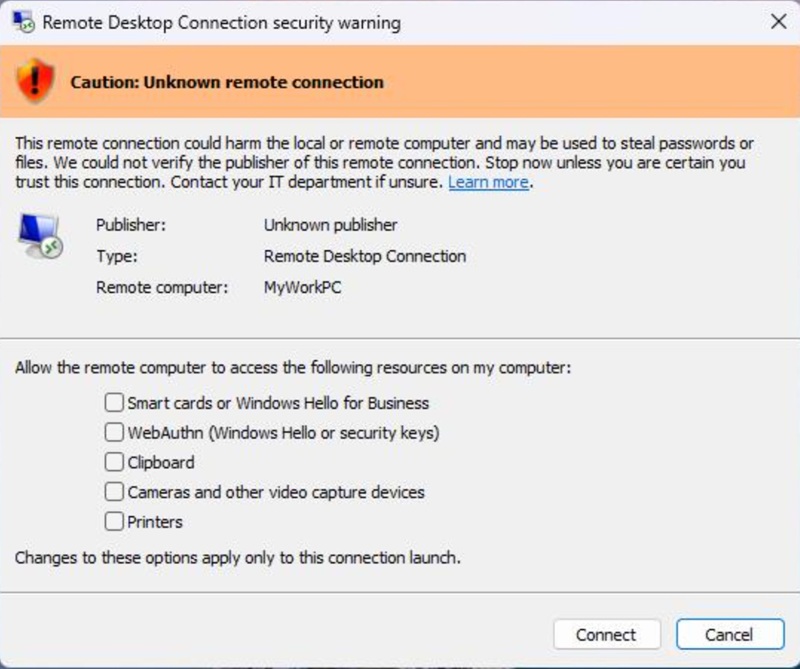
- Windows displays a security dialog before any connection is made
- The dialog clearly shows:
- The remote computer address
- Whether the RDP file is digitally signed
- The publisher name (if signed)
- Any requested redirection of local resources (drives, clipboard, devices, credentials)
- All resource redirections are disabled by default
- Unsigned RDP files are flagged as “Caution: Unknown remote connection”
A one‑time educational warning is also shown the first time an RDP file is opened after the update, explaining how RDP files can be abused in phishing attacks and encouraging users to verify connections carefully.
Importantly, these protections do not affect manually typed connections launched directly from the Remote Desktop application. They apply only to connections started by opening .rdp files.
Why Microsoft Requires Signed RDP Files
Microsoft’s decision to highlight and favour digitally signed RDP files is driven by a sharp increase in real‑world attacks abusing RDP file trust.
An RDP file is not just a shortcut. It can:
- Automatically connect to a remote system
- Redirect local drives, clipboard contents, smart cards, printers, microphones, cameras, and authentication mechanisms
- Grant a remote system access to sensitive local resources without obvious user awareness
Threat actors have exploited this by sending malicious RDP files via phishing emails, tricking users into connecting to attacker‑controlled servers and silently exposing credentials and data.
Digital signing does not make an RDP file safe by itself — and Microsoft is explicit about this — but it does provide:
- Authenticity: Proof that the file was created by a known publisher
- Integrity: Assurance the file has not been altered since signing
- Accountability: Visibility into who is responsible for the connection configuration
Windows now surfaces this information prominently so users and administrators can make informed trust decisions rather than blindly opening connection files.
Risks of Ignoring This Change
Ignoring RDP connection signing in Windows 11 introduces both security and operational risks.
From a security perspective, unsigned or poorly managed RDP files make it easier for attackers to:
- Redirect local drives and exfiltrate files
- Capture clipboard contents, including copied passwords
- Abuse smart cards, Windows Hello, or WebAuthn credentials
- Establish persistent access via trusted‑looking remote sessions
These risks are not theoretical — Microsoft has linked the changes directly to documented phishing campaigns and nation‑state attacks using weaponised RDP files.
From an operational perspective, organisations that continue using unsigned RDP files may experience:
- Increased user confusion and support calls
- Broken automation and scripts that rely on silent RDP launches
- Reduced trust in legitimate remote access workflows
- Compliance issues where signed configuration artefacts are expected
In short, unsigned RDP files now stand out — and not in a good way.
Who this affects
- MSPs
- IT support teams
- Software vendors shipping
.rdpfiles - Security‑conscious businesses
Overview of Available Options
Organisations using RDP have several practical paths available, depending on their risk tolerance and operational needs.
Option 1: Digitally sign RDP files
Using trusted certificates to sign RDP files allows Windows to clearly display publisher information and reduces user distrust during connections. This is the cleanest long‑term approach for managed environments.
For all PIP clients, instructions for signing your RDP icons can be found here. Alternatively contact the 24×7 PIP helpdesk for assistance.
Option 2: Reduce reliance on RDP files
Where possible, launching Remote Desktop sessions manually or via centrally managed tools avoids the new file‑based warnings altogether, as the safeguard applies only to .rdp files.
Option 3: Review automation and software workflows
Applications, scripts, and third‑party tools that rely on opening RDP files should be reviewed to ensure they remain compatible with the new security dialogs and consent requirements.
Option 4: Temporary compatibility adjustments (with caution)
Microsoft allows limited administrator‑level adjustments for compatibility scenarios, but explicitly warns that bypassing these protections reduces security and should be carefully evaluated.
The Bottom Line
Microsoft is not removing Remote Desktop — it is changing the trust model around how connections are initiated.
Windows 11 RDP connection signing is about making invisible risk visible. For environments like PIP private cloud, Windows 365 and Microsoft 365 that depend on Remote Desktop, adapting to this change is no longer optional — it is part of operating securely on modern Windows.