
|
|
Proxmox Mail Gateway
|
Proxmox Datacentre Manager
|
Backups that actually work
Proxmox Backup Server (PBS)

Proxmox Backup Server is backup done properly. Built specifically for your modern virtualised infrastructure, it delivers a fast, space‑efficient, cryptographically verified backup without agents, complexity or compromises. Every design decision is focused on reliability, performance and recoverability, because a backup that can’t be restored under pressure is not a what we call a backup. A backup brings complete peace of mind to your business and clients.
The Proxmox Backup Server dashboard centres on a web based GUI for managing backups. This serves as a centralised interface for monitoring system status, configuring settings and overseeing backup operations through intuitive visual analytics and controls.
Designed to integrate seamlessly with Proxmox Virtual Environment, Proxmox Backup Server becomes a natural extension of your cluster. A game changer in backup technology, it promotes key features such as incremental, deduplicated and snapshot consistent backups. All providing predictable performance, minimal storage growth and rapid recovery when it matters most. No bolt ons, no fragile dependencies. Just clean, simple to use engineered integration.
At PIP, we’ve trusted UNIX and Linux systems for decades. Our partnership with Proxmox brings that deep engineering heritage together with one of the most innovatory open source infrastructure platforms available today. The result is enterprise grade backup designed, deployed and supported by engineers who understand your storage, filesystems and failure modes. We are not just software installers.
Proxmox Backup Server, first publicly announced in July 2020 as a public beta. This marked the beginning of its development timeline and rapid evolution into a mature, reliable solution.
Enterprise Grade Backup Built for Virtualisation at Scale
Reliable backups are not optional. They are the last line of defence between a minor incident and a major outage.
Proxmox Backup Server is a purpose built, enterprise class backup platform designed specifically for all your modern virtualised environments. It delivers fast, space‑efficient, verifiable backups with deep integration into Proxmox Virtual Environment. It is tightly integrated to provide seamless backup and restore operations for virtual machines and containers. This close integration enhances user experience and simplifies management.
PBS offers advanced features and advantages such as deduplication, encryption, remote synchronization and efficient data protection. This makes it a comprehensive and efficient backup tool for any diverse environment. PBS supports granular file restores, various storage options and backup of both VMs and containers, ensuring flexibility and comprehensice data management.
At PIP, we combine decades of UNIX and Linux engineering experience with our official Proxmox partnership to design, deploy and support Proxmox Backup Server as part of resilient, production grade platforms across Australia. Proxmox Backup Server can easily replace expensive backup systems with an enterprise grade, open-source solution.
What Is Proxmox Backup Server?
Proxmox Backup Server is a dedicated backup solution developed by Proxmox Server Solutions GmbH. Unlike your traditional file based or agent heavy backup products, it is built from the ground up, for backing up:
- Virtual machines
- Linux containers (LXC)
- Host systems
- Application data and file sets
It uses block level, incremental backups combined with global deduplication and strong cryptographic verification. Allowing you to back up frequently, restore quickly and store significantly less data. All without compromising integrity or security. Proxmox Backup Server supports deduplicated backups of QEMU virtual machines and LXC containers.
Proxmox Backup Server uses a client server model, where the server stores backup data and the client tool works on most modern Linux systems. The client tool can be used via command line or GUI, enabling users to manage backups and data how ever they please.
The command line interface is available for administrators to configure and control backup operations directly,. Whilst the web GUI provides not only configuration but an over view of the jobs and progress. Proxmox Backup Server also supports a REST API for third-party tools, facilitating integration with other systems.
Backup storage in Proxmox Backup Server can be configured as a storage backend on a Proxmox VE node. This provides a flexible and secure storage option for backup management within the virtualization environment.
Proxmox Backup Server is based on the Debian Linux distribution and is licensed under the GNU Affero General Public License, version 3.
Proxmox Backup Server is self hosted, open and enterprise supported, making it ideal for organisations that require data sovereignty, auditability and long‑term platform stability.
Designed to Fit Perfectly into a Proxmox VE Cluster
Proxmox Backup Server is in no way am afterthought or third party bolt on. It is natively integrated into the Proxmox ecosystem to provide one stop solution with easy management.
.
When deployed alongside a Proxmox Virtual Environment (VE) cluster it provides:
- Native backup scheduling directly from Proxmox VE
- Centralised backup management across all nodes
- Consistent snapshot handling for VMs and containers
- Fast, predictable restores without complex workflows
From an operational perspective, this tight integration dramatically reduces:
- Backup complexity
- Administrative overhead
- Recovery time during incidents and disasters
For your IT team, this means fewer moving parts and far greater confidence when it matters most.
Core Architecture: Built for Performance and Integrity
Incremental, Block‑Level Backups
The first backup performed by Proxmox Backup Server is of course a full backup, ensuring all data is captured. However for subsequent backups, only the changed blocks, since the last backup are transmitted, making these incremental backups. This supports fast backups, as they significantly reduce the amount of data transferred and stored. Fast backups are further enabled by technologies such as QEMU dirty-bitmaps. These efficiently track changed sectors, eliminating the need to scan entire disk images. Proxmox Backup Server also implements data deduplication to minimize storage requirements. This results in:
- Faster backup windows
- Lower network utilisation
- Reduced storage growth or bloat over time
Global Deduplication
Data is deduplicated across all backups and all systems, not just within a single VM. This means identical blocks are stored once and referenced many times. This dramatically improves storage efficiency of data stores, especially in environments with similar workloads or templates. This results in deduplicated backups, again significantly reducing storage needs and network usage. Proxmox Backup Server also uses a garbage collection process to remove orphaned data chunks, data that is no longer referenced by any backup, further ensuring that unused storage is reclaimed efficiently.
Compression
Multiple compression algorithms are supported. Allowing optimal performance and balance between CPU usage and storage savings depending on workload, WAN/LAN constraints and hardware.
Cryptographic Integrity Checking
Every backup chunk is cryptographically check summed, providing:
- Early detection of data corruption
- Verification of backup integrity during restore
- Confidence that backups are actually usable, not just “successful”
Enterprise Grade Security by Design
End‑to‑End Encryption
Proxmox Backup Server supports client side encryption, meaning data is encrypted before it ever leaves the source system. Encryption keys remain under your control.
This is critical for:
- Compliance driven industries
- Medical and healthcare data
- Offsite or cross‑site backup architectures
- Those following the ASD Essential 8
Access Control and Authentication
Fine grained role based access control allows administrators to:
- Separate backup operators from system administrators
- Restrict restore permissions
- Enforce least‑privilege access models
Tamper‑Resistant, Immutable Backup Storage
Backup data is stored in an append only format, this immutable backup storage system is a necessity for reduce the risk of accidental or malicious deletion and protect against ransomware scenarios.
Scalable Storage and Deployment Options
Proxmox Backup Server is deliberately storage agnostic and flexible. It can be deployed using:
- Local disks
- ZFS storage
- RAID backed systems
- Dedicated backup appliances
- SMB or NFS Shares
- On‑premises, colocation or private cloud environments
A Proxmox backup server installation is typically performed on bare metal using an ISO image, which includes the management tools and a web-based GUI. Although we recommend PBS be installed bare metal using an ISO image for optimal reliability, we have on many occasions used virtualisation. Under this scenario though must be given to recovery from a total disaster recover (DR) scenario. To complement this, Proxmox Backup Server can synchronize backups to remote locations, thereby creating the belt and braces approach to backup management and disaster recovery capabilities.
This makes it ideal for:
- Single site businesses
- Multi site enterprises
- Air gapped backup strategies
- Offsite disaster recovery architectures
PIP designs Proxmox Backup Server deployments that align with your real world failure scenarios, not theoretical topologies or diagrams.
Advanced Backup Features – Explained Clearly
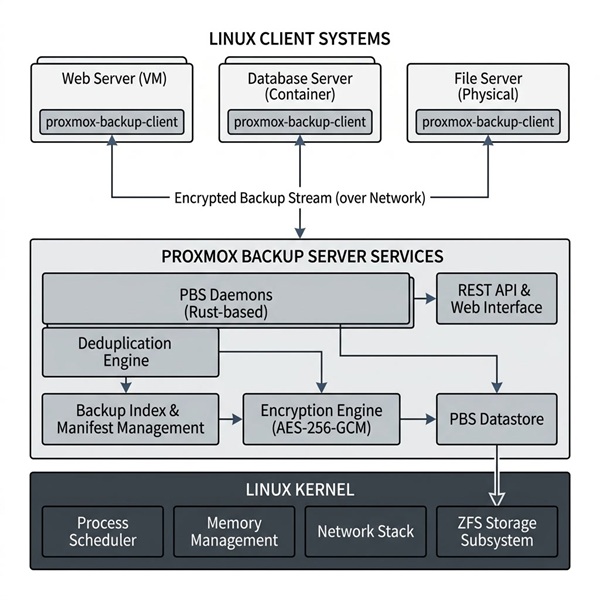
Linux Systems Support
Proxmox Backup Server (PBS) is engineered to deliver industry leading backup capabilities across a wide spectrum of Linux systems, including both virtual machines and containers. As an open source backup solution, PBS is compatible with most Linux distributions. Allowing organizations to safeguard their critical data regardless of their underlying infrastructure. This flexibility means that whether your environment consists of Ubuntu, CentOS, Red Hat, Debian or other Linux variants, PBS can be seamlessly integrated as your backup server. By supporting Linux systems natively, Proxmox Backup Server ensures your backup processes are streamlined and reliable. Reducing the risk of data loss due to hardware failures or unexpected outages. This comprehensive support empowers IT teams to manage, protect and restore data across diverse server environment. Making PBS a cornerstone of resilient infrastructure.
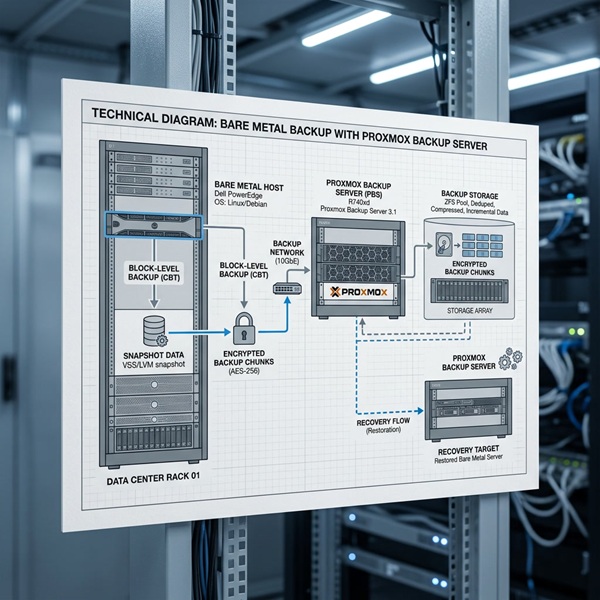
Bare Metal Backup
Proxmox Backup Server extends its powerful backup capabilities beyond your virtualised environments by offering full bare metal backup and restore for physical hosts. This feature enables organisations to create complete images of all their physical servers. Including the operating system, applications and all data. Providing an assurance that every aspect of the server can quickly be recovered in the event of a disaster. With bare metal backup, you can quickly restore a physical host to its original state. This minimises downtime and prevents data loss. Making PBS an ideal full backup solution for mixed infrastructure environments where both virtual and physical servers are critical to your operations. By integrating a complete bare metal backup into your backup strategy, you gain peace of mind knowing that your entire infrastructure, not just your virtual machines, are protected and can be restored efficiently if needed.
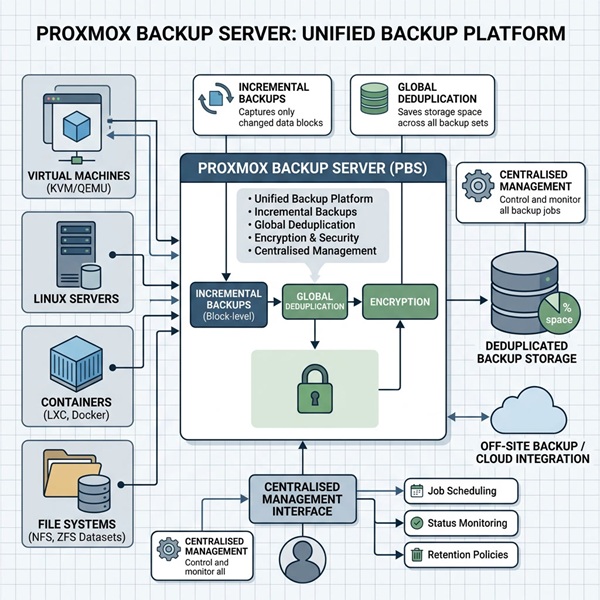
Backup Solution for Various Systems
Proxmox Backup Server stands out as a versatile open source backup solution. Purpose built to support a wide range of systems: including virtual machines, containers and physical hosts. This unified approach to backup management provides your organisation with the tools to oversee your backup data from a single, intuitive interface. Thus streamlining the process of managing backups across complex infrastructures. PBS ensures data integrity and availability by providing consistent, reliable backups for every system type in your environment. Whether you are protecting virtual machines, containers or physical hosts, Proxmox Backup Server delivers a cohesive backup solution that simplifies administration, reduces overhead and ensures your critical data is always secure and recoverable.
Why Proxmox Backup Server Beats Traditional Backup Products
Traditional backup software and backup tools often rely on:
- Heavy agents
- File‑level scanning
- Proprietary storage formats
- Complex licensing models
Proxmox Backup Server instead delivers:
- Predictable performance
- Transparent architecture
- Lower operational cost
- Long‑term platform stability
Organisations can also rely on Proxmox experts for enterprise grade support, ensuring optimal deployment and troubleshooting. Proxmox Backup Server also provides a REST API for integration with third-party tools, enabling flexible and automated backup management.
This is a backup system built for infrastructure engineers, not just checkbox compliance.
Who Proxmox Backup Server Is Ideal For
- A must for businesses running Proxmox VE clusters
- Any organisations migrating away from VMware & Veeam
- Medical and healthcare environments
- Compliance driven industries
- MSPs and service providers
- Enterprises that demand data sovereignty
- Those seeking compliance under ISO27001 or Australia’s ASD Essential 8.
If backups matter…. and they always do! Proxmox Backup Server is the platform they should be built on.
Best Practices for Backup Management
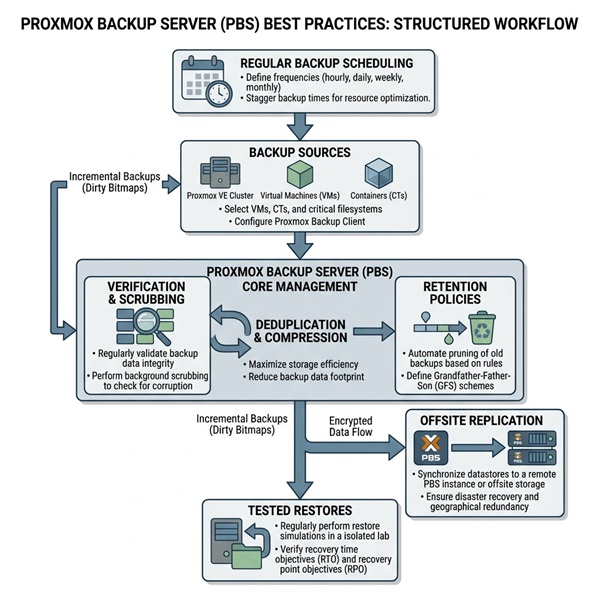
Effective backup management with Proxmox Backup Server starts with a well defined backup strategy. Implementing a regular schedule that includes both full and incremental backups is essential for protecting critical data and ensuring rapid recovery. Incremental backups in particular, optimise storage usage and reduce backup windows by capturing only the changes since the last backup. Monitoring backup jobs and reviewing logs daily is a necessity for administrators to detect and resolve issues before they impact data protection. It is also crucial to periodically test both backup and restore processes to verify that your backup server is functioning as expected and that data can be reliably restored when you need it. By following these best practices, organisations can ensure their backup management is robust, efficient and ready to safeguard their data against any data loss or desaster.
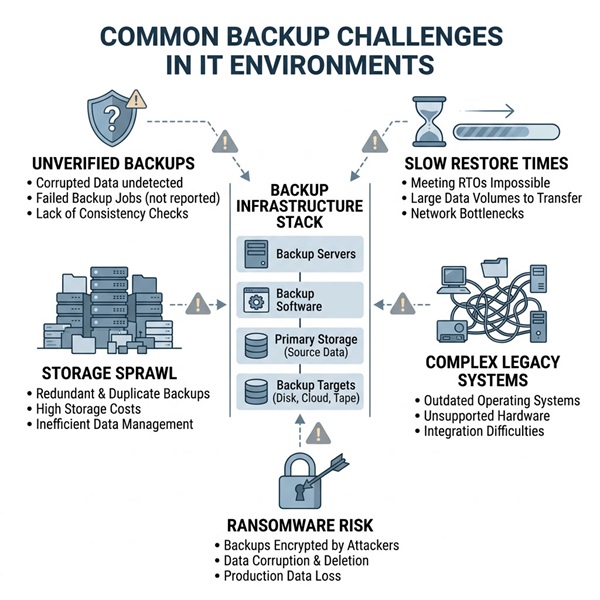
Common Backup Challenges
Managing backup data in modern IT environments comes with several challenges. These include controlling storage usage, maintaining data integrity and eliminating redundant data. Proxmox Backup Server addresses these issues head on with advanced features like data deduplication, compression and incremental backups. Proxmox data deduplication ensures only unique data blocks are stored. Significantly reducing storage requirements and eliminating redundant data across backups. Compression further optimises storage by reducing the size of backup files, making it easier to manage and transfer backup data. Incremental backups capture changes since the last backup, minimising both storage and network usage. By leveraging these capabilities, your IT team can overcome common backup challenges. This provides a backup strategy that is efficient, reliable and scalable, all while maintaining high performance and data integrity throughout the backup lifecycle.
PIP + Proxmox: A Partnership That Makes Sense
Proxmox Backup Server is only as effective as the platform it is designed into.
PIP has been delivering UNIX and Linux systems for decades, long before virtualisation became mainstream. Our engineers live and breathe:
- Linux kernel behaviour
- Filesystems like Ceph and ZFS
- Hyperconverged Storage Systems
- Storage performance tuning
- High‑availability and fault tolerance
- Backup, recovery and disaster planning
- Off site backup solutions
As an official Proxmox Partner, PIP combines:
- Proven open‑source engineering discipline
- Enterprise‑grade design methodology
- Local Australian support and accountability through its Sydney based NOC.
This is not vendor‑lock‑in infrastructure. It is engineered systems ownership.
Built Properly. Supported Properly.
At PIP, we don’t just install software, we engineer platforms for your business.
From architecture and sizing, through to monitoring, testing and recovery drills, we ensure your Proxmox Backup Server is:
- Correctly deployed
- Securely configured
- Actively maintained
- Ready when you actually need it
Together, PIP and Proxmox provide a virtualiaation technologies you can trust, understand and grow with.